Monday, September 14, 2020

MacOS High Sierra: Security going against the developer

The first major roadblock I faced was getting Vulkan to compile, install, and run on MacOS so that I could test with Gateware. This Vulkan install would make developing on iOS much easier for the graphics libraries, as much of the same code could be used with MacOS. The main problem was security, or rather user permissions. As of MacOS High Sierra, the user no longer has permission to write to the "/usr/local" directory. Vulkan uses a Python script to install to your local machine, and this script assumes a few things, one, that you already have a couple of folders made in the "/usr/local" directory, and that those directories can be written to by a user.

The solution that I ended up using was not a very clean one. I had run the script many times, looking out for the error messages, and changed my folder structure and user permissions until I got the installer to install Vulkan. First the installer wanted a folder at the directory "/usr/local/include" to be created, but there is a problem, the average user cannot make folders in the "/usr/local/" directory. So I had to change the permissions to allow myself to change the folder structure there. I ended up creating the folder and when I ran the Vulkan installer again, I found that it wanted more folders to be created, first the "include" folder, then the "library" folder, then the "bin" folder, and so on. These errors would only appear one at a time, after I created each folder. So the process went like so: Run the installer and see what folder needed to be created next, then create the folder, and repeat for every folder that the installer will make in the "/usr/local/" directory. After all of the folders were created, then the installer would give errors such as "/usr/local/library/ directory permission denied" and I had to change the permission level of all of the folders that I just created. Eventually I had every folder created and Vulkan would then finally install properly. All that was left was to build and run Gateware and get the Unit Tests working on Mac. 

Overall this experience has taught me a lot about the permission system on Unix based machines. I did not know much about it until this experience requiring me to go and research many commands to do what I needed to do. Getting Vulkan on MacOS should enable me to develop graphics libraries on iOS much easier, as I wouldn't have to write a new graphics library from scratch. Now I should be able to reuse at least some of the code from the MacOS implementation of Vulkan to get things going.

CMake and C++/WinRT Pt. 2

     Another slow week but not due to lack of work. I've been stuck in CMake again for the last week as it is very crucial to have it working correctly before we start porting Gateware over to UWP. Last week had me getting CMake to compile a C++/WinRT project in a Gateware test environment. While I was successful, it was not without it's faults.

The Problem:

    The first problem that became clear was that the library that Gateware uses for unit tests, Catch2, was not giving output for the tests it was running. UWP works fundamentally different from anything Gateware has seen. UWP is not able to launch windows dynamically from a console application like all current supported platforms of Gateware. This means that a console is not present, therefore no console output.

    This led to the discovery of another problem. The first thing that was done after discovering that there was no output was to run through the code of Catch2 to see where it was outputting the test data and see what alternatives were available. That is when it was discovered that I could not debug in this project. It was possible in other C++/WinRT projects that Visual Studio provided, but not in the one CMake made.

 The Solution:

    While the debugging problem was discovered 2nd, it was important to solve it first so that the output problem can be found and fixed. After many hours of Googling and going over Stack Overflow forums, it turned out to be a one line fix. It was one linker debug flag that needed to be set by CMake, DEBUG:FASTLINK. 

    With that out of the way I was able to dig into Catch2 to find where it was outputting the test information. I narrowed it down to an if statement checking a config data structure that is never set in the current implementation of our tests. By changing a string in that config structure to "%debug", it used used OutputDebugString() instead of cout. OutputDebugString() displays a string in the debug output window in Visual Studios. With the test session now using the config struct, it started outputting test output data to the debug output window for devs to read. This now allows us to know what libraries are going to need ported and which ones are going to work as is.

To Do:

    I am still currently trying to get the UWP unit tests and the Win32 unit tests in the same solution via CMake. This has proven to be very difficult as the current version of CMake does not support different target platforms in the same Visual Studios solution.

Friday, September 11, 2020

Ghost Windows & PS4 Controller Input

Gateware is going through its last round of bug fixes before version 1.2a is released. The hope was to have the release ready at the start of this past week, but a few new bugs and several failed manual tests set us back a bit. These issues have the potential to cause grief to any developer that uses Gateware. Having them fixed will ensure developers have a consistent, hassle-free experience with Gateware.

New bugs

During all this testing, I found several new issues:

  • On Mac, GWindow tests sometimes cause a closed window's outline to remain on the screen. 
  • On Mac, GController does not detect the down button of a PS4 controller. 
  • On Linux, GController doesn't respond to Xbox controller connection events. 
  • On Windows, GInput tests do not pass the scroll-wheel checks. 

It wasn't immediately clear to me how to fix these problems. Other minor issues came up during the tests, but they were straightforward enough to fix on the spot.


Ghost windows

The shadow left behind by a closed window looks ghost-like to me. It would also stick around or "haunt" the desktop until all Unit Tests had finished.


I found the Create() and Reconfigure() Unit Test I made last week was the only place the problem occurred. I narrowed it down further to it happening only when the window is reconfigured to or from fullscreen. I'm not certain what the root cause of the issue is. However, if the Unit Tests are slowed down, thereby creating more time between window transitions, each window closes without leaving behind a shadowy remnant. Slowing down the code causing the transition to and from fullscreen fixed half of the problem. Waiting for the window to finish resizing before styling it, fixed the other half. I'm not satisfied with the solution as it is difficult to follow. There must be a better way to handle window style changes on the Mac, but I haven't found it yet. For now, the current solution works.

Mouse move crashes

Just as I was running my last round of Unit Tests to verify my ghost window fix, I found another bug from something I worked on in the past. Towards the end of the Unit Tests, a window is created for GBufferedInput. If your mouse happens to move within that window while it is on screen, the program crashes with an EXC_BAD_ACCESS error. The error seemed similar to the EXC_BAD_ACCESS errors I was getting last week with GWindow. The error occurred when the window was deallocated before an overridden NSResponder function like windowWillClosed() had been called. In this case, the window was being deallocated before mouseMoved() had been called. Luckily, this was an easy fix; stop mouse events before closing the window.


PS4 directional-pad partially supported

I would not have noticed this bug if the Mac driver for my wired Xbox controller was still working. Thankfully, connecting the PS4 controller to Mac with Bluetooth is easy to do, requiring no additional driver downloads. I know the D-Pad on the Xbox controller is detected fine because I tested it with these Unit Tests a few weeks ago. After the PS4 controller failed the down button test, I modified the Unit Test to check the other directional buttons. I discovered the up button was the only D-Pad button that was detected. GController_mac.hpp has a hefty amount of code checking the input of the controller. Thankfully, all the code I needed to modify was in a big switch statement laid out sensibly enough that I could make modifications easily. After outputting the raw controller D-Pad values, I added them to the directional code already in place. Afterward, the D-Pad passed its Unit Test.


More to go

Even though the D-Pad problem is fixed, there might be more issues with PS4 input. Updating the current controller Unit Test to test more controller input values would verify controller input is detected correctly. There is also the controller connection issue on Linux and the GInput scroll wheel detection on Windows that I haven't gotten to yet. After all that is done, Gateware users will finally get access to version 1.2a and all its glory.

Tuesday, September 8, 2020

CMake and C++/WinRT

    Not a long blog post this time as not a lot has happened in the beginning week of month 2, as I was still finishing up and incorporating feedback into my final draft of my research paper while also packing up and flying back to Florida. That being said, I was still given a task to complete.

The Problem    

    CMake is an open-source, cross-platform family of tools to build, test, and package software (CMake, n.d.). Because of CMake's cross-platform capabilities, it is used for the distribution of Gateware. That way, whatever platform an end-user is on, a project file is compiled and made correctly for them to use and develop on. My task for this week was to make a CMakeLists.txt, the file that CMake uses to set up the IDE project files, that will make a C++/WinRT project. The problem that made itself evident very quickly was the very little documentation available on how to do that task.

The Solution

    After many hours of scouring over the internet, I found a reply to a GitHub issue post that claimed to have done was I was searching for (Lindfors, 2017). They linked to a CMakeList.txt file that they had made, and it did appear to have everything that would be needed for a C++ UWP Visual Studios project. The only thing that appeared to be missing was the C++/WinRT NuGet package that is required to link to the WinRT APIs.

    Taking that post as inspiration and something to bounce off of, I made my own version of it using the code from the C++/WinRT Core Application template that Microsoft provides. This worked great, the only issue was that the NuGet package for C++/WinRT was not installed, just as I suspected. Because it wasn't installed the project did not compile, but it would once I manually installed the package from the NuGet Manager. While this worked, this creates more work for the end-user. The less work the end-user has to get their code running the better, so I set out to fix this issue. 

     This led me to finding out that NuGet has a restore feature built right into Visual Studios. All I needed to do was make sure to include a packages.config file in the Visual Studio solution that CMake compiles. That file lets Visual Studio know what NuGet packages are installed. It checks that file every time the end-user builds the solution and re-installs any missing packages if need be. Including that file let Visual Studios install the C++/WinRT NuGet package without doing so manually, therefore fixing that problem.

References

CMake. (n.d.). CMake. Retrieved September 8, 2020, from cmake.org

Lindfors, J. (2017). Leverage CMake to generate project using cppwinrt. Retrieved on September 2, 2020 from https://github.com/microsoft/cppwinrt/pull/126/files

Friday, September 4, 2020

GWindowStyle Flag Issue

Background
While working on the WINDOWEDLOCKED flag, a feature to lock a window's size, I found an issue on Linux when creating a GWindow using either the WINDOWBORDERLESS or FULLSCREENBORDERLESS flags. When calling Create() with one of these flags, the program generated a "Bad Match" error and crashed. At the time, I added the issue to GitLab and finished up with the feature I was working on originally. Last week, I came back to the issue and found that the problem was more widespread than just the two flags.


A problem on all platforms

GWindowTest.hpp was missing a Unit Test that called Create() with each existing style flag, so I made one. After running this test on each platform, I discovered the results of using some of the flags varied. While the program didn't crash on Windows, using either of the fullscreen flags did not produce a fullscreen window. Similar problems were on the Mac. After creating a spreadsheet to track all the flags with issues, I considered there might be even more problems when using the second function that uses style flags, ReconfigureWindow(). The table below shows the results of calling Create() with each flag and if it is visually correct on each platform.


Style flag issues when calling Create()


More problems

ReconfigureWindow() can be called anytime after Create() to change the style of a GWindow. I saw a potential issue with using different combinations of calling Create() and then ReconfigureWindow(). My theory was that creating a window with one flag may affect how a window is reconfigured with another flag. To ensure all windows restyle correctly, I made another Unit Test for all the possible combinations of calling Create() and then ReconfigureWindow(). There are six flags tested against each other, 36 tests total. Running the test on each platform revealed more issues. Each table below is for one of the three different platforms Gateware runs on. The left column is the flag used when calling Create(). The top row is the flag used to call ReconfigureWindow() after calling Create(). The tables below show which combination of flags produce visually correct results on each platform.


Windows working flags calling Create() then ReconfigWindow()

Linux working flags calling Create() then ReconfigWindow()

Mac working flags calling Create() then ReconfigWindow()


Windows and Linux

Fixing the issues on Windows and Linux didn't take much time. I already had familiarity with those GWindow implementations from working on the WINDOWEDLOCKED and SetIcon() features. The tests on these operating systems are running on recent computers. As a result, the turn around time of making changes and testing happens quickly. The Mac was a more involved process. 


Mac

On the Mac, the style flag issues with calling Create() had straightforward solutions. However, fixing the problems calling ReconfigureWindow() on the Mac was not as easy as the other platforms. The Mac I am using is from 2012, running the latest version of macOS. As a result, it is a significantly slow computer to develop on. Building and running Gateware takes anywhere from 1 to 10 minutes. On this platform, the biggest issue I faced was with all the animations whenever a window changes its size or position. I have found that making changes to a mid animation window produces strange results, especially to or from fullscreen. 


For example, a fullscreen window cannot immediately minimize. The window must be brought out of fullscreen before it can minimize. If the window is transitioning out of fullscreen when minimize is called, something strange happens; the window will appear in the dock as if it had minimized; however, the animation of the window transitioning from fullscreen will continue to a windowed state that is visible on the desktop. The minimized version of the window will come out of the dock and merge with the desktop window.


There is a way to stop animations. However, this only causes more strange behavior. On the Mac, fullscreen windows exist in their own space beside the desktop. With animations turned off, bringing the window out of fullscreen and minimizing it will work as expected, but the space it existed in will remain. This behavior is likely because when animations are off, Mac developers are expected to handle specific actions that are normally performed for you. I haven't found a way to delete empty spaces, and it appears macOS developers have no way to do so at this time. Running through all of the Unit Tests results in multiple unoccupied spaces that aren't deleted until the program stops.


The solution I came up with to minimize a fullscreen window is to leave animations on, wait for the window to exit fullscreen completely, and then minimize the window from there. This solution works nicely. Unfortunately, I have to return SUCCESS from ReconfigureWindow() even though the window hasn't been told to minimize yet. However, I don't see any other way to go about it.


Most of the flag issues on the Mac were simple fixes that could be addressed with general solutions. The rest required more specific solutions to handle each particular case. The last eight flag situations I worked on took twice the amount of time to work on than the other 41. As ReconfigureWindow() began styling windows more visually correct, I started getting errors from other Unit Tests, adding to the existing list of issues.


Even more problems on the Mac

Calling Maximize() immediately followed by Minimize() causes the program to crash with an EXC_BAD_ACCESS error. I believe this might be a threading issue. The error doesn't always happen, which is a trait of threading issues. I think this issue is caused when trying to change a windows state while it is in transition to another. I've found that this can be avoided by waiting for the window to maximize fully before calling Minimize(). 


Another new Mac issue is the debug message "not in fullscreen state." This is being reported whenever I try to toggle out fullscreen while the window is transitioning to fullscreen. I haven't found a way to stop the transition or force it to go back. Overriding animationResizeTime() - a method of NSWindow - so that it returns 0 helps to some degree. Although I haven't noticed any differences in the window's transition animation timing, I receive less debug messages. After testing it further, this might be causing windows to stick around long after their Unit Test is over, so I won't be using this.


One last Mac issue is with IsFullscreen(). It reports when a window is fullscreen. However, it can report a window as fullscreen even though it is still transitioning to fullscreen. This misreporting is potentially an issue if a program needs to be sure the window is fullscreen before moving on. This is something that I discovered while looking into the problems I mentioned above. The current IsFullScreen() implementation checks if the window has a fullscreen flag set, which is done when toggleFullScreen() is initially called. I tried modifying this to also compare the window size to the size of the screen, but this is not reliable either. The window can be the size of the screen and still be in its transition animation. The best option might be returning a boolean value that changes based on fullscreen events. This solution would change the function's behavior from returning true when the window is on its way to fullscreen, to returning true when it is fullscreen. However, this would require further testing because the Mac implementation of GWindow will behave differently than how it has been. I also don't know if any other Gateware libraries use IsFullscreen(). If so, they might be affected as well by the changes in behavior I described.

The Mac solution

Waiting for each transition and style change to complete fully avoids any issues. I accomplished this by transitioning the window to a neutral state before moving on to its final state. This only needs to be done when the window is fullscreen or minimized. When that is the case, the window is transitioned into a windowed state (the neutral state) first and then brought into its final state. This behavior is not how the Windows and Linux implementations of GWindow work, but with the Mac this is the cleanest way to it. Especially with the Unit Tests that open, close, and resize windows at blazing fast speeds. 


Conclusion

I may have said it before, but Unit Tests are very helpful in uncovering issues with implementation. Catching these problems now means developers who use Gateware won't experience them later. Although I struggled more than I would have liked to on the Mac issues, I gained valuable insight into how NSWindow works and how to work with it.

Tuesday, September 1, 2020

The Beginning of a Journey

 The iOS Revolution

    Hello Gateware. I am Jacob Morales, and I will be on Gateware over the next few months. I just started as a developer for Gateware just two days ago. At this time, I have gotten Gateware built and running on two machines, one running Windows and one running MacOS. My goal is to port Gateware over to iOS, so that it could be brought to iPhone, iPod, and iPad, so that potential customers could use Gateware on those platforms. I still need to do more research on getting Gateware onto iOS. There is a lot still unknown, so I will get back to my research.

Monday, August 24, 2020

Trials and Tribulations of Getting Gateware to Compile in C++/WinRT

 Since last week, I have finished my first draft of my research paper on the port of Gateware to UWP. In the process of doing that I managed to bring all of the Gateware libraries to an C++/WinRT template project and get it compile successfully. I am not using any of the libraries but it was not a plug and play process, there were compiler errors that needed to be taken care of. This is blog post I will be going over what I had to do to get it to compile.

The first thing I did was include the libraries in a C++/WinRT template:


pch.h:
Top of the "main" file:


The First Error

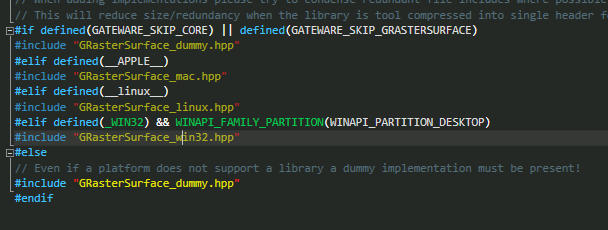
This led me to GRasterSurface_win32.hpp.

This function is found in wingdi.h. Turns out it is not found because it is found under:

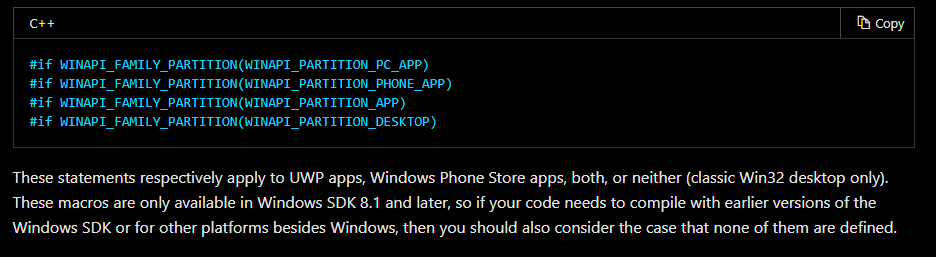
This led me down the rabbit hole of "What is WINAPI_PARTITION_DESKTOP?" After some googling I found a Microsoft doc that went over what it is:
So SetDIBitsToDevice only works on a Win32 desktop app as a UWP app is WINAPI_PARTITION_APP.
I ended up fixing this by just bypassing GRasterSurface_win32 and using the dummy implementation for now.
That fixed the compiler errors.

Prototyping a GWindow Implementation

Using what I found out with the WINAPI definitions, I edited GWindow.hpp:
GWindow_UWP.hpp is the prototype. I started to fill out some of the cookie cutter stuff in my implementation:

Summary

This exercise was immensely helpful in giving me ideas on how I will be doing my port over the next 3 months. It also helped quite while finishing up my rough draft over the last week. I do see the example "triangle.h" that we give end-users changing quite a bit. I also believe end-users are going to have to know some C++/WinRT API calls, this will have to be disclosed to them.

The next 3 months are going to be busy and I definitely have my work cut out for me. 

Resources